QNAP TR-002 2-Bay USB 3.1 GEN 2 RAID Expansion Enclosure
QNAP TR-002 2-Bay USB 3.1 GEN 2 RAID Expansion Enclosure
$ 91.17
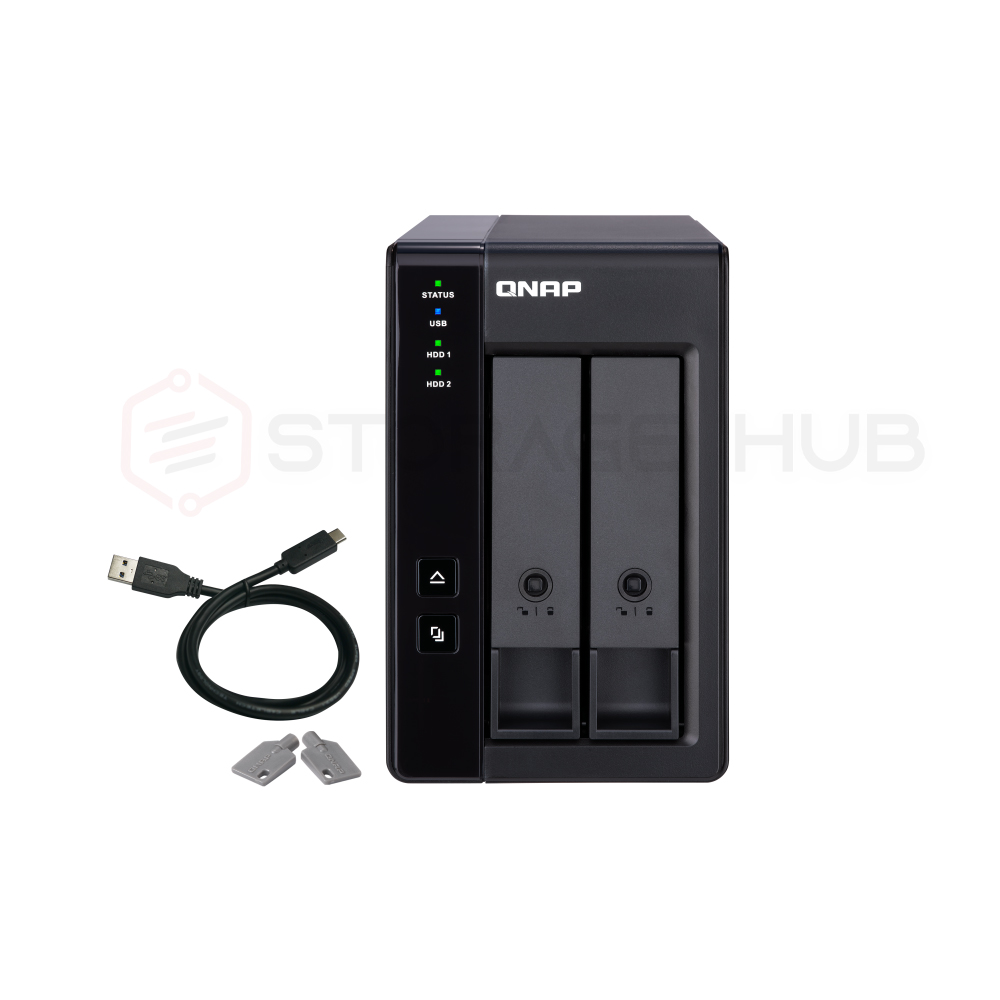
QNAP TR-002 2-Bay USB 3.1 GEN 2 RAID Expansion Enclosure The TR-002 USB 3.2 Gen 2 RAID expansion enclosure allows you to expand the capacity of your QNAP NAS and PC. The TR-002 can also be utilized as a DAS (Direct-attached Storage) device, allowing you to directly access its content just by connecting it via USB. The TR-002 features two 3.5-inch SATA drive bays with USB 3.2 Gen 2 Type-C connectivity to bring you a highly-reliable and secure storage capacity expansion solution. USB 3.2 Gen 2 (10Gbps) USB 3.2 Gen 2 Type-C port* for faster data transfer. Maximum 1M USB cable is recommended. Supports SATA drives Supports up to two SATA drives. Disk mode DIP switch Disk mode DIP switch to change from Hardware Control and Software Control configurations for setting RAID group. Lockable drive trays Lockable hard drive trays to prevent accidental drive removal. Easy to eject Eject button for disconnecting the TR-002 from a NAS or computer*. Requires the QNAP External RAID Manager utility. Effective storage expansion with RAID Support The TR-002 is an ideal storage expansion solution for PCs, especially for laptops which lack the ability to install higher-capacity drives. Featuring two 3.5-inch SATA drive bays and supporting RAID configuration, the TR-002 provides the ability to store a vast number of files and data and to ensure protection against potential drive failure. Supports various RAID levels The TR-002 supports various RAID configurations. Depending on your requirements, you can switch between hardware- or software-controlled RAID modes. Move the DIP switches to corresponding positions for your ideal RAID mode: Individual, JBOD, RAID 0 or RAID 1. You can also configure the RAID settings from your QNAP NAS, or by using the QNAP External RAID Manager utility on your computer. Learn More: External RAID Manager Individual Mode Treats every disk as separate storage space, allowing you to independently access each one. Drive hot-swap is not supported in this mode JBOD Mode All the disks are recognized as a single drive. This allows maximal storage utilization but provides no data protection. RAID 0 Mode Data is split amongst the drives. RAID 0 provides the fastest performance but does not protect data from drive failure. RAID 1 Mode Half of the total storage capacity is used to store data, and the other half keeps a copy of this data. This provides high data protection at the cost of only being able to use half the installed storage space. Software Ctrl Mode Use this mode to control the RAID configuration from your NAS or computer. Flexible storage configuration and management Compared with other RAID enclosures, the TR-002 provides software-controlled configurations for greater management flexibility. Users can configure RAID and monitor disk health using Storage & Snapshots Manager on a QNAP NAS, or by using the QNAP External RAID Manager utility on their computer. Use Storage & Snapshots Manager to configure the TR-002 as a storage expansion unit for your QNAP NAS. In addition to RAID configuration, the NAS expansion storage mode supports various NAS functions, including storage pools and snapshots. By choosing external storage mode, you can use the TR-002 as a DAS. Note: When connecting the TR-002 to a NAS, users can choose to use either the NAS expansion storage mode or the external storage mode. The QNAP External RAID Manager is a utility for Windows and Mac users to set up, monitor, and view the status of the TR-002. Users can easily configure RAID groups on the TR-002 and quickly obtain the status of RAID performance and health at a glance. Versatile usage scenarios to meet storage expansion needs The TR-002 meets many storage expansion requirements for home and work use, including: Scenario 1: Expand the capacity of your NAS The TR-002 allows users to expand their NAS storage capacity. By connecting the TR-002 to their NAS and using the Storage & Snapshots Manager, users can easily configure and manage their storage expansion. The TR-002 supports a variety of QNAP NAS storage and file management functions, allowing users to build storage pools, find files with Qsirch and organize files with Qfiling. Function QNAP TR-002 Other external RAID device Connection Type USB 3.2 Gen 2 By device Drive bays 2 By device Supported systems QNAP QTS, Windows, macOS, Linux etc… QNAP QTS, Windows, macOS, Linux etc… Disk health monitoring Supported (QNAP QTS, Windows, macOS) Not Supported Hardware RAID protection Supported (QNAP QTS, Windows, macOS) Varies by device Expand Storage Pool Supported (QNAP QTS) Not Supported RAID migration, capacity expansion Not Supported Varies by device Note: 1. The TR-002 does not support the following: the TS-128, TS-228, TS-131, TS-231, TS-431, TS-431U, and NAS models that cannot be updated to QTS 4.3.6 (or later). 2. The TR-002 can only be used as an individual storage pool or volume on the NAS. Its storage pool/volume cannot be combined into the connected NAS. NAS applications cannot be installed on the TR-002. 3. Drives can only be migrated from one TR-002 to another TR-002. The files and data stored on drives moved to/from a NAS (or another device) will not be recognized. 4. Drive hot-swap is not supported in the Individual Mode for the TR-002. TR-002 Specs JBOD Connection Interface USB Main chip Micro processor with hardware RAID Drive Bay 2 x 3.5-inch The system is shipped without HDD. For the HDD compatibility list, please visit https://www.qnap.com/compatibility/ Drive Compatibility 3.5-inch bays: 3.5-inch SATA 6Gb/s, 3Gb/s hard disk drives 2.5-inch SATA 6Gb/s, 3Gb/s hard disk drives 2.5-inch SATA 6Gb/s, 3Gb/s solid state drives You can only use one disk type (HDD or SSD) in a RAID group. Combining different types of disk in one RAID group is not supported. TR-002 does not support the QDA-A2AR/ QDA-A2MAR. Hot-swappable USB 3.2 Gen 2 (10Gbps) Port 1 x Type-C USB 3.2 Gen 2 10Gbps Form Factor Tower Dimensions (HxWxD) 168.5 × 102 × 219 mm Dimensions do not include foot pad (foot pad may be up to 30mm / 1.18 inches high depending on model) Weight (Net) 2.25 kg Weight (Gross) 2.25 kg Operating Temperature 0 – 40 °C (32°F – 104°F) Storage Temperature -20 – 70°C (-4°F – 158°F) Relative Humidity 5-95% RH non-condensing, wet bulb: 27˚C (80.6˚F) Power Supply Unit Minimum 36W adapter (12VDC), 100-240VAC Power Consumption: HDD Sleep Mode 2.98 W Power Consumption: Operating Mode, Typical 10.15 W Tested with drives fully populated. Fan 1 x 70mm, 12VDC System Warning Buzzer Kensington Security Slot QTS / QuTS hero Windows Ubuntu Mac Used as Hardware RAID (DAS) Standard Warranty 2 RAID 1 RAID 0 JBOD Single Disk Note: Use only QNAP memory modules to maintain system performance and stability. For NAS devices with more than one memory slot, use QNAP modules with identical specifications and refer to the hardware user manual to install compatible QNAP memory modules. Warning: Using unsupported modules may degrade performance, cause errors, or prevent the operating system from starting. QNAP reserves the right to replace partial parts or accessories if the original is no longer available from its manufacturer/supplier. Any replacement would be fully tested and verified to meet strict compatibility and stability guidelines and will deliver identical performance to the original. The terms HDMI, HDMI High-Definition Multimedia Interface, HDMI trade dress and the HDMI Logos are trademarks or registered trademarks of HDMI Licensing Administrator, Inc. Product images are for illustrative purposes only and may differ from the actual product. Due to differences in monitors, colors of products may also appear different to those shown on the site. Designs and specifications are subject to change without notice.