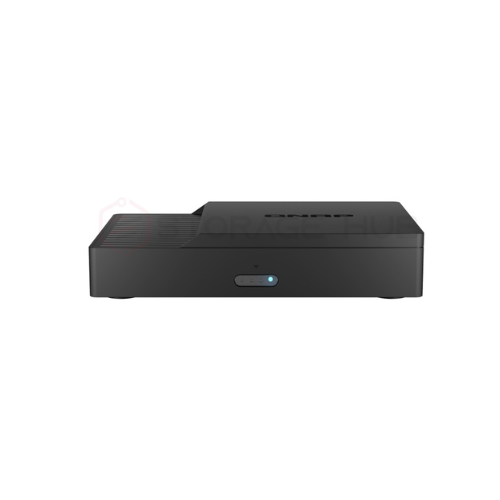
QNAP 4K Video Conferencing/Wireless Presentation System – KoiBox-100W
QNAP 4K Video Conferencing/Wireless Presentation System – KoiBox-100W
$ 97.64
QNAP KoiBox-100W 4K Video Conferencing/Wireless Presentation System – KoiBox-100W Running the KoiMeeter video conferencing operating system, the KoiBox-100W is the ideal replacement for costly SIP-based conferencing systems and features value-added 4K wireless projection, four-way communication, and local storage features. Creating private meetings with the KoiBox-100W provides higher security and privacy compared with public cloud meetings, and the auto-answering function provides greater convenience in certain usage environments. Besides private meetings, the KoiBox-100W streamlines communication between different platforms by allowing joining Zoom®, Skype™, Microsoft Teams®, Cisco Webex®, and Google Meet™ calls. 4K wireless projection Present with a 4K high-resolution visual experience. Four-way communications Multi-point video conferencing with QNAP KoiBox-100W, KoiMeeter,and the KoiMeeter mobile app. Join cloud meetings Use cloud-based meeting platforms almost every day? No problem! The KoiBox-100W supports well-known cloud meeting services. Share mobile phone screens Scan the QR code on the KoiBox-100W display to quickly share your mobile phone screen. Local storage Install a 2.5-inch SATA drive to store meeting videos, audio, and files. Connect, click, and start your meetings! Simply connect the KoiBox-100W to an HDMI™ display and network, and you’re ready to go. Coupled with affordable cameras and microphones, you can easily start video conferencing and wireless presentations without requiring complex settings. Simply call another KoiBox-100W, KoiMeeter system, KoiMeeter mobile app, or compatible SIP system (such as Avaya® or Poly®) to start a high-resolution video conference, or alternatively join other cloud conferencing rooms*. The KoiBox-100W is the ideal solution for budget-constrained organizations to deploy in all their meeting rooms. Multiple I/O. Easy to use. ① Attach a power cord ② Video output to an HDMI™ display ③ Plug in a conference speaker, camera, keyboard, or mouse in the USB 3.2 Gen 2 Type-A ports. ④ Connect to a Gigabit Ethernet network ⑤ Kensington Security Slot ⑥ Supports Wi-Fi 6 ⑦ Install a 2.5-inch SATA HDD/SSD (sold separately) ⑧ Use the RM-IR004 remote control The KoiMeeter video conferencing operating system KoiMeeter, engineered for optimal video conferencing experience, is the ideal solution for organizations to create private meeting systems with trusted security. It also offers great compatibility with mainstream cloud video conferencing services for seamless communication. The highly-anticipated 4K wireless projection makes it easy for all members in the same meeting room view the KoiBox-100W screen on an HDMI™ display without needing a dedicated computer. Learn More: KoiMeeter Up to four-way video conferencing and collaboration The KoiBox-100W can form up to 4-way video conferencing with QNAP NAS running the KoiMeeter and mobile phones with KoiMeeter mobile app*. The KoiBox-100W also supports SIP systems and cloud meeting platforms for cross-platform communications. *Note: The host of 4-way video conferencing must be a KoiBox-100W or KoiMeeter system. Join meetings with NAS Install KoiMeeter on a QNAP NAS to transform the NAS as a video conferencing system! Learn more:KoiMeeter Join meetings from mobile devices Join meetings from anywhere by using the KoiMeeter mobile app. Learn more:KoiMeeter mobile app Join meetings from computers Join meetings in a web browser (Chrome™ or Firefox®) by using the browser-based version of KoiMeeter. Learn more:KoiMeeter Join cloud meeting rooms KoiBox-100W is well-integrated with popular cloud meeting platforms. Join meetings with SIP systems Flexibly join a multi-point video conference launched by a SIP system (such as Avaya, Poly, and others). Join cloud meetings through your browsers Easily join meetings (including Zoom®, Skype™, Microsoft Teams®, Cisco Webex®, and Google Meet™) as a guest from your web browser for productive and flexible remote collaboration. Optimized Zoom, Skype, and Microsoft Teams experience KoiBox-100W is highly integrated with Zoom®, Skype™, and Microsoft Teams® to provide an optimal meeting experience. You can log into your Microsoft Teams account via the KoiBox-100W for smoother Teams meetings. Automatically answer calls Ensure you never miss any calls and meetings by enabling the auto answering function. It is useful for scenarios such as elderly or disabled people, or assembly line workers who can’t leave their position. Note: Auto Answering is disabled by default for privacy concerns. Ensure that your environment is private and secure before enabling Auto Answering. 4K wireless projection. Free yourself from cables. No cables. No software installation. KoiBox-100W provides a seamless wireless projection experience free from complex cabling and without the need of buying additional projection devices. Cast your screen using a browser Open a browser (Chrome™ or Firefox®), enter the display’s IP address, and project your screen to start the presentation. No additional wireless projectors, dongles, or software is needed. 4K UHD playback KoiBox-100W supports up to 4K Ultra HD resolution that delivers your presentation with optimal image quality to engage your audience. Four-way split screens Display up to four split screens from different devices in a single presentation. Four projection modes Presenters can choose from “entire screen mode”, “specific application window mode” and “Chrome tab mode” to fit their needs. Screen Mirroring from macOS® and iOS® devices is also supported. Notes: Firefox® does not support “Chrome tab mode”. Remote projection Simultaneously project one screen to multiple KoiBox-100W or KoiMeeter systems via the Internet for greater flexibility and convenience. Setup and manage with ease. System connection The KoiBox-100W IP is displayed on the main page. Use Qfinder Pro to find every KoiBox-100W IP on the same LAN. Address book The address book helps to quickly find contacts and meeting rooms. Meeting room administrators can also import the address book list to save time. Meeting minutes Check all the meeting videos stored in the disk and process more settings. Auto answer calls Turn on the auto answer feature, and the receiver KoiBox-100W will automatically answer incoming calls. Share your mobile phone screen Simply scan the KoiBox-100W QR code to project your mobile phone screen and camera display on a monitor. Remote view and chat room Meeting participants can remotely view the presentation on their computers and use the built-in chat room to share files and have their voices heard. Record and store meetings KoiBox-100W includes a 2.5-inch SATA drive bay (SSD/hard drive sold separately) for storing meeting video (roughly 13 MB per minute), audio, and files in the chat room. Note: Meetings created through Zoom®, Skype™, Microsoft Teams®, Cisco Webex®, and Google Meet™ can only be recorded based on their rules for cloud recording. Easy-to-use, affordable video conferencing and wireless presentation experience As an all-in-one video conferencing and wireless presentation solution, KoiBox-100W is perfect for small-to-medium meeting rooms, director’s offices, classrooms, lecture halls, and even home environments. Video conferencing Members in the meeting room can share the KoiBox-100W projection screen on an HDMI™ display without needing a dedicated computer. Multi-site offices can launch private/cloud meetings, share presentations and perform training courses while reducing travel expenditure. Mobile meetings Home/remote workers can easily join video conferences using the KoiMeeter mobile app – enabling smart working and enhanced engagement without impacting business and personal productivity. Wireless presentations for lectures Schools, conference centers, and lecture halls can utilize KoiBox-100W for wireless presentations and lecture recording. Listeners can easily view the presentation on their computers with the Insight View function. Online study or home entertainment Wirelessly cast your computer or mobile phone screen to a big TV for a more comfortable visual experience when studying, watching videos, or sharing family photos. KoiBox-100W bandwidth requirements The minimum download/upload speeds Host Client Group Video Conference (4 peers) Download: 6.5Mbps Upload: 14.5Mbps Download: 5.5Mbps Upload: 2.5Mbps You might also need the following Most of the devices compliant with USB standards can work with the KoiBox-100W. The listed devices below are tested and recommended by QNAP. Camera Conference Speaker Camera Microphone Logitech Rally Camera AVerMedia PW515 Jabra Speak 410 Jabra Speak 510 Jabra Speak 710 AVerMedia AS311 Logitech MeetUp AVerMedia PA511D Note: 1. Mandatory accessories: camera (keyboard and mouse are necessary for joining cloud meetings) 2. Optional accessories: Conference speaker, camera, and microphone system KoiBox-100W CPU Intel® Celeron® 6305 Processor 1.80 GHz System Memory 4GB DDR4 Flash Memory M.2 2242 SSD 30GB Drive Bay 1 x 2.5-inch SATA (HDD/SSD not included) Gigabit Ethernet Port 1 x 1GbE RJ45 Wi-Fi Intel Wi-Fi 6 AX201, 802.11ax HDMI Output 1 x HDMI 1.4b output USB Port 4 x USB 3.2 Gen 2 Type-A IR sensor Yes, supports remote controller (RM-IR004) Buttons 1 x Power button LED Indicators Power status (On: blue, Standby: blue breathing light, Off: red) Power Supply Unit 36W, 100-240V DC, 50/60Hz Security Slot 1x Kensington security slot Dimensions (H x W x D) 45 x 232 x 152 mm Net Weight 1.09 kg (2.4lbs) Operating Temperature & Relative Humidity 0 ~ 40˚C ( 32˚F ~ 104˚F ),5 – 95% RH non-condensing Note: Use only QNAP memory modules to maintain system performance and stability. Warning: Using unsupported modules may degrade performance, cause errors, or prevent the operating system from starting. QNAP reserves the right to replace partial parts or accessories if the original is no longer available from its manufacturer/supplier. The terms HDMI, HDMI High-Definition Multimedia Interface, HDMI trade dress and the HDMI Logos are trademarks or registered trademarks of HDMI Licensing Administrator, Inc. Product images are for illustrative purposes only and may differ from the actual product. Due to differences in monitors, colors of products may also appear different to those shown on the site. Designs and specifications are subject to change without notice.